Fun Schedulers
sched_ext makes writing weird and creative schedulers surprisingly accessible. Here are some schedulers built with hello-ebpf that show just how far you can take it.
Sound Scheduler
Blog: Part 20 — A Scheduler Controlled by Sound
Talk: Sound of Scheduling — Chemnitz Linux Days 2025
Source: github.com/parttimenerd/loudness-scheduler
Shout at your computer to make it run faster. The scheduler reads the microphone every 100 ms and scales the number of active CPU cores with loudness. Louder room → more cores allocated; library quiet → CPU cores are throttled. The idea came from Andrea Righi during OSPM 2025.
How it works
The BPF half is a FIFO scheduler with two GlobalVariable knobs the Java side updates
continuously:
@BPF(license = "GPL")
@Property(name = "sched_name", value = "loudness_scheduler")
public abstract class FIFOScheduler extends BPFProgram implements Scheduler {
    final GlobalVariable<Integer> cores = new GlobalVariable<>(
            Runtime.getRuntime().availableProcessors());
    final GlobalVariable<Integer> sliceNs = new GlobalVariable<>(-1);
selectCPU round-robins tasks across the active core count:
@Override
public int selectCPU(Ptr<task_struct> p, int prev_cpu, long wake_flags) {
    if (!bpf_cpumask_full(p.val().cpus_ptr)) {
        return bpf_cpumask_first(p.val().cpus_ptr);
    }
    return (@Unsigned int) (prev_cpu + 1) % cores.get();
}
enqueue shrinks each task's slice proportionally to queue depth — louder input means
more cores, shorter per-task slice, higher throughput:
@Override
public void enqueue(Ptr<task_struct> p, long enq_flags) {
    var slice = sliceNs.get() == -1 ? 5_000_000 : sliceNs.get();
    var scaledSlice = (@Unsigned int) slice / scx_bpf_dsq_nr_queued(SHARED_DSQ_ID);
    scx_bpf_dispatch(p, SHARED_DSQ_ID, scaledSlice, enq_flags);
}
The Java main loop samples the microphone and pushes updated values every 100 ms — changes take effect in the kernel in under 100 ms, with no restart needed.
Bonus: frequency-controlled time slices
Pass --frequency 440 to scale each task's time slice by the dominant frequency in the
microphone input. Calibrate mode shows you what the scheduler sees:
> ./scheduler.sh --calibrate --frequency 440
Loudness:  0.0 -> cores:  1, top frequency:    -1 -> slice 147.0ms
Loudness:  7.0 -> cores:  8, top frequency:    23 -> slice 139.0ms
What it demonstrates
| Component | Role |
|---|---|
@BPF + @BPFFunction |
The scheduler's BPF callbacks |
GlobalVariable<Integer> |
cores and sliceNs — written by Java, read in BPF |
SchedulerBase + DispatchQueue |
FIFO foundation |
| Java main loop | Polls microphone, updates globals |
The interesting part is not the scheduler algorithm — it's that the scheduling policy is controlled by a Java thread reading a microphone, with changes taking effect in under 100 ms, all without a kernel patch.
Running it
git clone https://github.com/parttimenerd/loudness-scheduler
cd loudness-scheduler
mvn package
sudo java -jar target/loudness-scheduler.jar
Requires a microphone (or any ALSA input device) and Linux ≥ 6.14 with sched_ext enabled.
Taskclicker
Source: github.com/Mr-Pine/taskclicker
Submitted to: sched-ext-kit-contest
Taskclicker is a Linux CPU scheduler where you are the scheduler. A GUI shows you all runnable tasks; you click a task to dispatch it to a CPU.
"Well… As I'm writing this, I'm not sure if this is what I was supposed to build when they tasked me with writing a fcfs scheduler for gaming with focus on interactivity… But well, it exists now, for better or for worse so have fun." — Mr-Pine, README
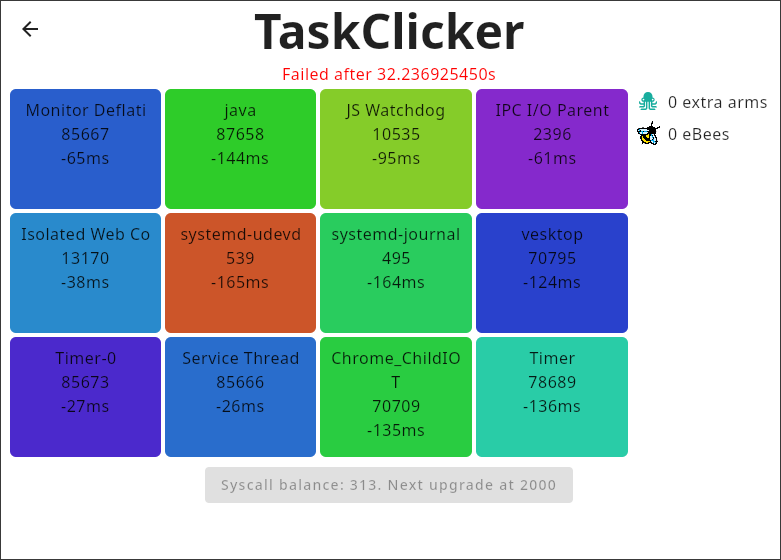
Can you keep your system fully interactive before the 30-second task timer runs out? (Spoiler: the README was written with Taskclicker running.)
Written in Kotlin (69 %) + Java (31 %), it wires hello-ebpf's sched_ext support into a desktop game. Build and run:
Your scheduler here?
If you build something interesting with hello-ebpf sched_ext support, open a PR or file an issue to add it to this page.