Getting Started with test-order
This tutorial walks you through using test-order from scratch. By the end, you'll have tests running in priority order with affected tests surfacing first.
Time required: ~5 minutes.
Upgrading from an earlier snapshot? Check CHANGELOG.md before updating. The current unreleased version contains breaking changes: the property namespace
testorder.select.*was renamed totestorder.affected.*(e.g.-Dtestorder.select.topN→-Dtestorder.affected.topN), and the Gradle tasktestOrderSelectwas renamed totestOrderAffected. Old names produce an "unknown property" warning with a suggested replacement.
Prerequisites
- Java 17+ installed (tested in CI on LTS releases 17, 21, 25 and current 27)
- Maven 3.8+ or Gradle 7.6+
- A Git repository (recommended; the default
uncommittedchange-detection mode uses git. Non-git projects can usechangeMode=since-last-runinstead.) - A project with JUnit 5/6, TestNG 7.x+, or Kotest tests
Using TestNG? The setup is the same — add the plugin and run
mvn test. The TestNG integration module (test-order-testng) is included automatically. See test-order-testng/README.md for TestNG-specific behaviour, or FRAMEWORK_COMPARISON.md for a side-by-side comparison with JUnit 5.
Quick check:
bash scripts/check_prerequisites.sh   # or just verify manually:
java -version && mvn --version && git --version
Step 1: Add the plugin
Maven
First, add the Sonatype snapshot repository to your pom.xml so Maven can resolve the 0.0.1-SNAPSHOT artifact:
<repositories>
  <repository>
    <id>ossrh-snapshots</id>
    <url>https://central.sonatype.com/repository/maven-snapshots/</url>
    <snapshots><enabled>true</enabled></snapshots>
  </repository>
</repositories>
<pluginRepositories>
  <pluginRepository>
    <id>ossrh-snapshots</id>
    <url>https://central.sonatype.com/repository/maven-snapshots/</url>
    <snapshots><enabled>true</enabled></snapshots>
  </pluginRepository>
</pluginRepositories>
Then add the plugin inside <build><plugins>:
<plugin>
  <groupId>me.bechberger</groupId>
  <artifactId>test-order-maven-plugin</artifactId>
  <version>0.0.1-SNAPSHOT</version>
  <extensions>true</extensions>  <!-- required: lets the plugin participate in Maven's lifecycle resolution.
                                       Without it, prepare can't auto-bind to process-test-classes and learn mode
                                       silently does nothing — the most common "Wrote fallback payloads" cause.
                                       See CHEAT_SHEET.md (Troubleshooting) if you hit that message. -->
  <executions>
    <execution>
      <goals><goal>prepare</goal></goals>
    </execution>
  </executions>
</plugin>
Tip — one-time settings.xml change: Add
me.bechbergerto~/.m2/settings.xmlonce to enable the shortmvn test-order:showprefix instead of typing the full group ID every time:
Gradle
Add the Sonatype snapshot repository to settings.gradle so Gradle can resolve the plugin:
pluginManagement {
    repositories {
        maven {
            url 'https://central.sonatype.com/repository/maven-snapshots/'
            mavenContent { snapshotsOnly() }
        }
        gradlePluginPortal()
    }
}
Then add to your build.gradle:
plugins {
    id 'me.bechberger.test-order' version '0.0.1-SNAPSHOT'
}
Warning — Gradle snapshot repository placement: Do not add the snapshot repository to your project's regular
repositories {}block — only topluginManagement.repositories {}. Adding it to project repositories can expose snapshot JARs for your dependencies and cause "Failed to load JUnit Platform" errors when stale JARs shadow your project's versions.
Alternative: Gradle init script (no build file changes)
If you want to try test-order without modifying any build files, save this as test-order-init.gradle:
initscript {
    repositories {
        maven {
            url 'https://central.sonatype.com/repository/maven-snapshots/'
        }
        gradlePluginPortal()
    }
    dependencies {
        classpath 'me.bechberger:test-order-gradle-plugin:0.0.1-SNAPSHOT'
    }
}

projectsLoaded {
    allprojects { project ->
        if (project.buildFile.absolutePath.contains('buildSrc')) return
        project.plugins.withId('java') {
            project.apply plugin: me.bechberger.testorder.gradle.TestOrderPlugin
        }
    }
}
Then run any Gradle command with --init-script path/to/test-order-init.gradle.
Step 2: Run tests (learn mode)
On the first run, the plugin automatically enters learn mode. In the default offline instrumentation mode, the plugin modifies your compiled classes at build time to record which source classes each test exercises. A lightweight collector server receives these recordings during the test run and writes the dependency index.
# Maven
mvn test

# Gradle
./gradlew test
What you'll see:
[INFO] [test-order] Auto-instrumenting classes for offline learn mode: .../target/classes
[INFO] [test-order] Instrumented 42 classes (skipped 0)
[INFO] [test-order] Offline learn mode (MEMBER): using pre-instrumented classes
[INFO] [test-order] IndexCollectorServer started on port 54321 (v2 binary protocol enabled)
[INFO] [test-order] IndexCollectorServer merged 8 test classes via socket
[INFO] BUILD SUCCESS
After the learn run, the dependency index is written to .test-order/test-dependencies.lz4. You can gitignore this directory — the plugin auto-learns on the first run for any new checkout.
Instrumentation modes: The default is
offline(build-time bytecode instrumentation — the plugin modifies compiled classes before tests run, no-javaagentflag needed on the test JVM). Useofflineunless you have a specific reason not to — it works with all standard Maven/Gradle setups. To use online instrumentation instead (agent attached at runtime via-javaagent), pass-Dtestorder.instrumentation=online. Online mode avoids modifying bytecode on disk; it is useful when your security policy or build environment prohibits class-file mutation (e.g., read-only build directories, OSGi containers, or strict reproducible-build pipelines). It requires the agent JAR to be locatable on the classpath. Both modes report dependency data through the sameIndexCollectorServer.
Step 3: Make a change and re-run
Edit a source file — for example, modify a method in one of your service classes. Then run tests again:
# Maven
mvn test

# Gradle
./gradlew test
What you'll see:
[INFO] [test-order] Order mode — 2 changed classes detected (uncommitted)
[INFO] [test-order] Reordered 8 test classes by priority score
[INFO] Running com.example.ServiceTest        ← runs first (exercises changed code)
[INFO] Running com.example.ControllerTest     ← second priority
[INFO] Running com.example.UtilTest           ← unrelated, runs last
...
[INFO] BUILD SUCCESS
Tests that exercise your changed code now run first. If something breaks, you'll know within seconds — not after the full suite completes.
Step 4: Inspect the prioritization
Note —
showrequires a learn run first:showreads the dependency index, so it requires a prior learn run to have happened. If you see "no index found", runmvn test(ormvn -Dtestorder.mode=learn test) once first.
See exactly how tests are ranked:
# Maven
mvn test-order:show

# Gradle
./gradlew testOrderShow
Example output:
Changed classes: com.example.Service

  #    Test Class                    Score  Deps  Fail  Changed Duration
  -    ----------------------------- ------ ----- ----- -------- --------
  1.   com.example.ServiceTest          14   2/8           yes     12ms
  2.   com.example.ControllerTest        5   1/8                   18ms
  3.   com.example.UtilTest              1                          4ms [FAST]
  4.   com.example.IntegrationTest       0                        320ms [SLOW]

Showing 4 of 4 tests | Score range: 0–14 | 1 changed class
Step 5: View the dashboard
Generate an interactive HTML report:
# Maven — live server (recommended; auto-reloads on each test run)
mvn test-order:serve

# Maven — write static file
mvn test-order:dashboard
open target/test-order-dashboard/index.html

# Gradle
./gradlew testOrderDashboard
open build/test-order-dashboard/index.html
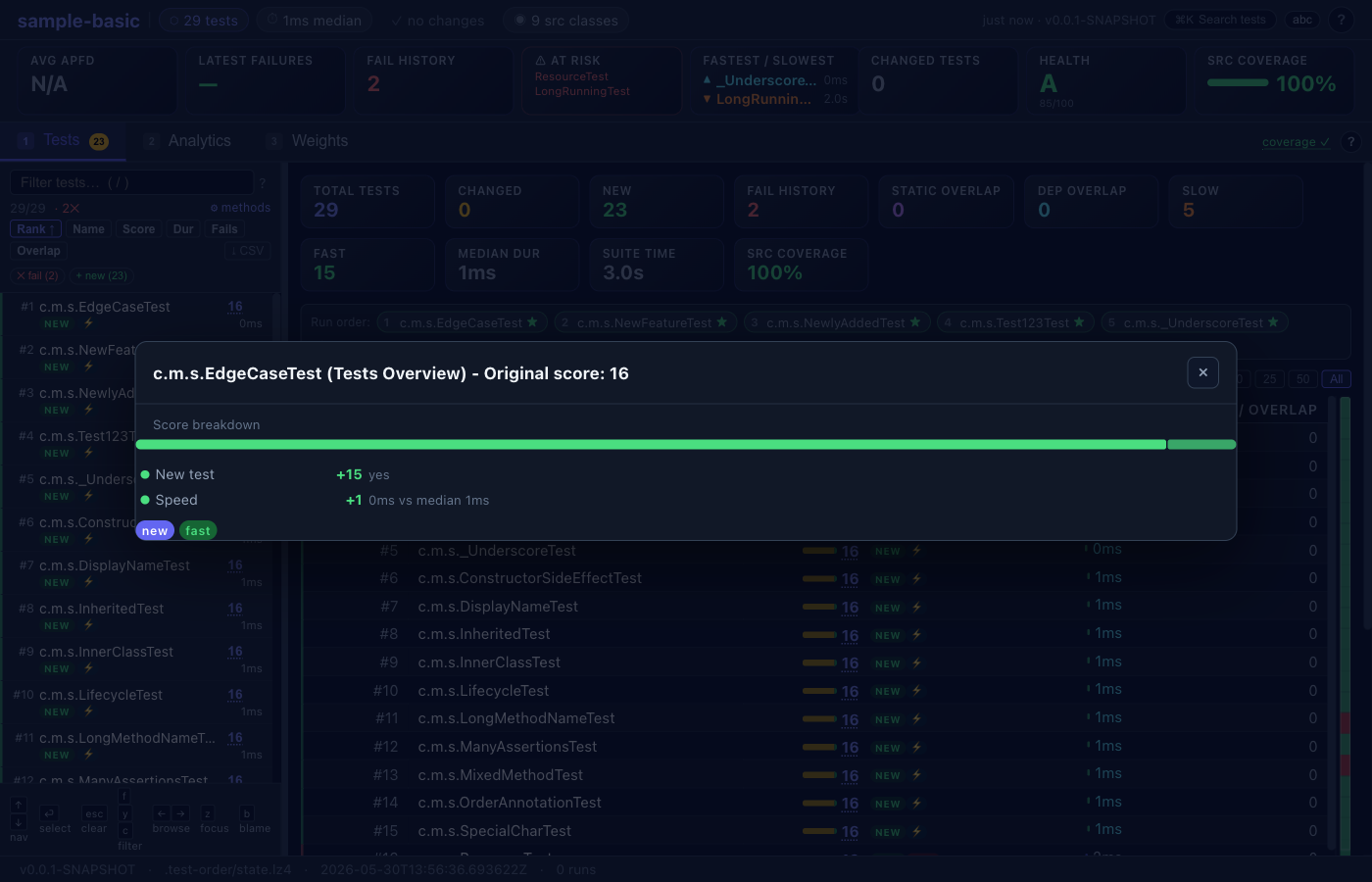
The dashboard has three tabs:
- Tests — ranked list of all test classes with score breakdown, run history sparklines, and a detail panel showing per-run pass/fail, position history, similar tests, and source dependencies.
- Analytics — APFD timeline across all runs, per-run drill-down (failures, rank changes, diffs vs previous run), rank heatmap, failure correlation matrix, time budget optimizer, and 15+ further analysis panels. Use
←/→to navigate between runs. - Weights — tune the five scoring components and instantly preview how ranks change. Share configurations via URL hash.
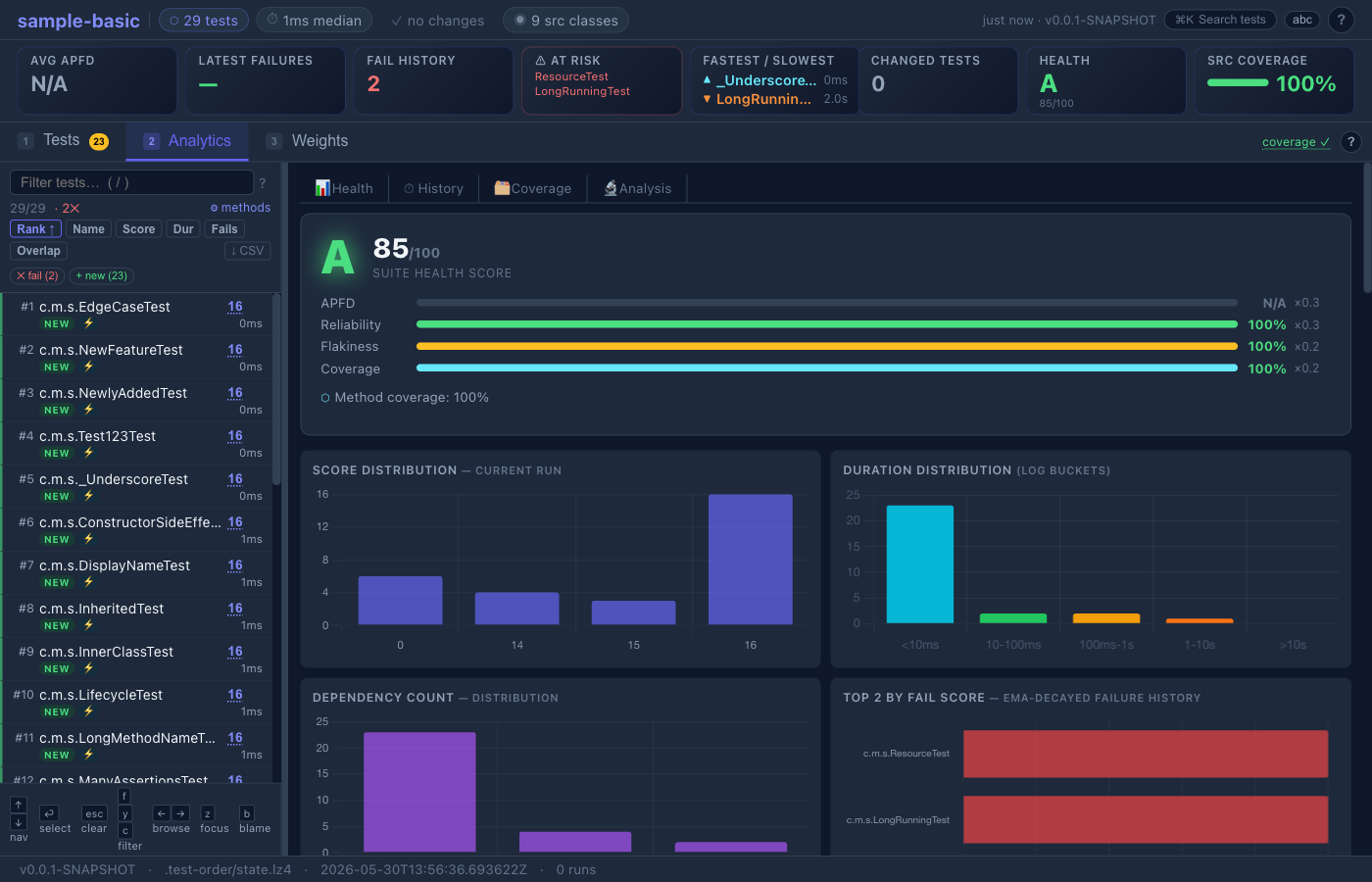
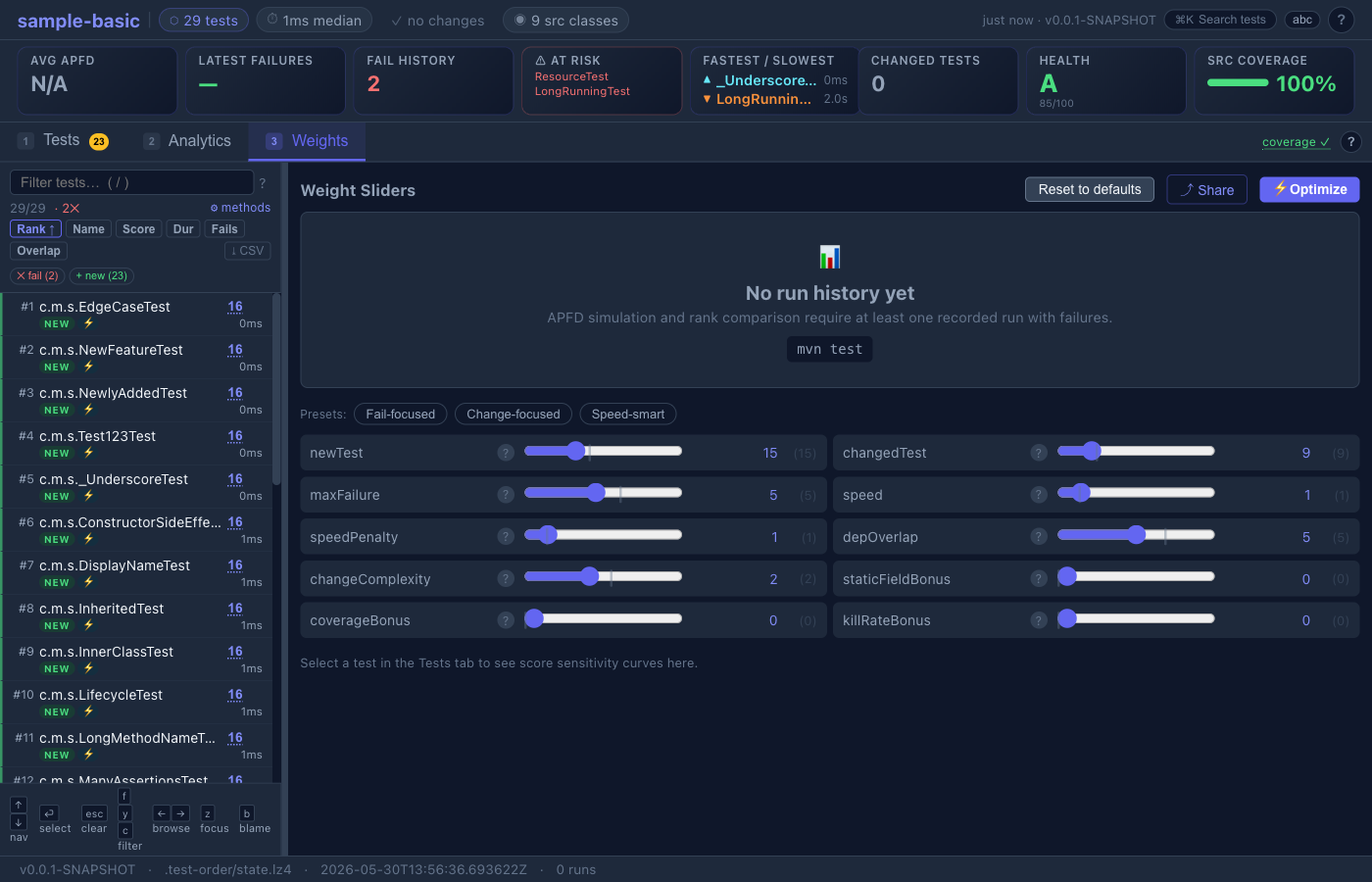
The KPI bar at the top shows APFD, latest failures, pass streak, clean-run count, at-risk tests, estimated time savings, and a suite health grade (A–F). The run history sparkline lets you browse past runs without leaving the page.
Full feature reference: test-order-dashboard/README.md
Step 6: Diagnose issues
If something doesn't look right:
# Maven
mvn test-order:diagnose

# Gradle
./gradlew testOrderDiagnose
This checks index health, agent attachment, framework detection, and configuration issues.
.gitignore
The simplest setup — just gitignore everything (the plugin auto-learns on first run):
.test-order/
target/test-order-dashboard/
build/test-order-dashboard/
If your learn run is slow and you want to share the index, commit .test-order/test-dependencies.lz4 and only gitignore the rest.
Try it hands-on
The project includes sample projects you can experiment with immediately:
# Clone and build test-order (see docs/DEVELOPMENT.md for details)
git clone https://github.com/parttimenerd/test-order.git
cd test-order
mvn install -DskipTests -Dspotless.check.skip=true

# Run the basic sample
cd samples/sample-basic
mvn test                  # learns dependencies
mvn test                  # reorders tests
mvn test-order:show       # inspect rankings

# Try the realistic shopping app sample
cd ../sample-shop
mvn test
mvn test-order:dashboard
Note: The
-Dspotless.check.skip=trueflag is only needed when building the test-order framework itself (it runs code formatting checks). The sample projects don't need it.
Common Pitfalls
| Symptom | Cause | Fix |
|---|---|---|
| "Wrote fallback payloads" every run | <extensions>true</extensions> missing | Add it to the plugin block (see Step 1 above) |
| Tests always run in the same order | Learn run never completed, or index not found | Check that .test-order/test-dependencies.lz4 exists; re-run mvn test |
No plugin found for prefix 'test-order' | Maven doesn't know the plugin prefix | Add me.bechberger to ~/.m2/settings.xml <pluginGroups>, or use the fully-qualified form mvn me.bechberger:test-order-maven-plugin:<version>:show |
| All tests score 0, nothing reordered | Plugin running but no changed classes detected | Try -Dtestorder.debug=true to see what change detection reports; check testorder.changeMode setting |
No index despite running mvn test | Source packages not detected (groupId mismatch) | Set -Dtestorder.includePackages=com.yourpackage |
since-last-run always shows all classes as changed | Hash snapshot (hashes.lz4) is missing or was not updated | The source-hash baseline is only updated during learn runs — run mvn test -Dtestorder.mode=learn or mvn test-order:snapshot to advance it |
| JaCoCo reports 0% coverage | Hardcoded <argLine> in Surefire | Replace with @{argLine} so JaCoCo and test-order chain correctly |
| "Failed to load JUnit Platform" (Gradle) | Snapshot repo in project repositories {} lets a stale snapshot JAR shadow your project's JUnit Platform version | Move the snapshot repo to pluginManagement.repositories {} only — see Step 1 above |
| Every test lands in tier-1 in CI (tiering defeated) | Shallow clone: HEAD~1 unavailable, so since-last-commit treats every source file as changed. Look for the log line git revision HEAD~1 is unavailable. | On GitLab: set variables: { GIT_DEPTH: 0 }. On GitHub Actions: actions/checkout@v4 with fetch-depth: 0. Or switch to -Dtestorder.changeMode=since-last-run. |
| Tests start failing after enabling test-order | Pre-existing test isolation bug exposed by reordering — tests that share static state, temp files, or DB rows may only fail in certain orders | Run mvn test-order:auto test -Dtestorder.shuffle=true a few times to reproduce which tests pollute others |
-Dtest=... filter active but test-order ignores it / no reordering | When -Dtest is set, test-order deliberately skips auto-selection and delegates entirely to Surefire (logged at INFO). This is intentional — test-order won't override your explicit filter. | Run without -Dtest to get auto-selection, or use -Dtestorder.mode=order with -Dtest to get ordering-only without selection |
Next steps
| Goal | Guide |
|---|---|
| Quick reference (bookmark this) | CHEAT_SHEET.md |
| Set up CI with tiered testing | docs/ci-examples/ |
| Configure multi-module projects | docs/MULTI_MODULE_SETUP.mdx |
| Tune scoring weights | docs/SCORING.md |
| Enable ML failure predictions | docs/MAVEN_PLUGIN.md (ML section) |
| Build from source / contribute | docs/DEVELOPMENT.md |
| Full CLI & properties reference | docs/CLI_REFERENCE.mdx |
Uninstalling
test-order makes no permanent changes to your project. To remove it completely:
- Remove the plugin from your
pom.xml(orbuild.gradle) - Delete the state directory:
rm -rf .test-order/ - Remove the
.test-order/entry from.gitignoreif you added one
Your tests will immediately go back to their default execution order.